19 07 2010
How do I know if my BlackBerry is Hard-locked?
Every once in a while, we get customers requesting BlackBerry Unlock Codes only to find out that their phone was hard-locked to begin. They become upset because they cannot unlock their phones and a great burden is pressed on us as well.
We decided to blog on this to ensure that you double check that your BlackBerry is NOT hard-locked before purchasing a code. This is the most prevalent on BlackBerries purchased from E-bay, Craigslist and other third party markets. The instructions are listed below and requires no technical savvy.
1.) Go to the Options Menu (it is represented by a picture of a wrench)
2.) Go to Advanced Options
3.) Go to SIM Card
4.) Type MEPD (they do not have to be caps) – You will not see any text appear as you type it
5.) A new menu will appear with SIM, Network, Network Subset, Service Provider and Corporate.
PLEASE NOTE:
If all fields are “disabled” or “inactive”, your phone is already unlocked. Also, if any of the categories say blocked, then that means that the phone is also hard locked or the phone may have been reported as lost or stolen.
6.) Type in MEP2 – Again, you will not see any text appear.
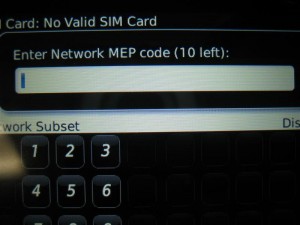
7.) A new Box will appear like the image above.
The number in Brackets represents the number of tries you have remaining before your phone is hard-locked. All BlackBerries come with MEP (10 Left). If your phone is hard-locked, it will say MEP (0 Left). In this case, your phone cannot be unlocked and is permanently locked to its Network Carrier.
Hopefully this answers the questions to those searching! You can check out one of our posts on how to know if your BlackBerry is already unlocked here.
iPhone 4 to be sold Factory Unlocked in Canada Rogers One Rate Roaming Pack NOT as Advertised
Comments are currently closed.
Hi Admin,
I have got the BB torch 9800 from UK with Orange Network.It was unlocked or hard locked I don’t know. I gave to dealer who can do unlocked the mobile. But somehow dealer said me that it was hard locked we cant do.I don’t know about how many tries left in there..Can I download the software in my laptop and follow the instruction…Will it be helpful for unlock the hard locked or not?
Please suggest me any helpful ideas.
Thank you
@Palchok: In case your BB is hard-locked (= no tries left), it cannot be unlocked by code anymore unfortunately. To check how many tries you have left, please follow the instructions in the article. Hope it will work out for you!
@odalpo: To check if your device is hard-locked, you will need to check the numbers which are displayed next to each entry on the list, especially the “Network” entry. If it is 0, your device is hard-locked.
Hello;
I want to know if my phone Tourch 9800 is hardlocked or not;
SIMDisabled
Networ:Active
NetworkSubset:Disabled
ServiceproviderDisabled
Coprate:Disabled
PhoneNumber:
Unknown Number(My number)
@squishy: You will need to obtain the Network Unlock Code for your BB. You can easily do this by going to http://www.cellfservices.com/ and ordering it. If you are unsure about the carrier it is locked to, please hit up our Live Support or send an Email to [email protected] and we’ll get you covered.
I have a bb 9780 everything is disabled except network says active…1hat can I do? I put my mobilicty sim card in from my other phone says phone requires an unlock codde??? Can I use my phone with any serivce provider and how do I teLl what company my phone os locked to???
Got a phone my SIM isnt working in it on Typing MEPD SIM, Network, Network Subset, Service Provider and Corporate all shows disabled but am unable to get to the MEP2 bit to confirm if its blacklisted. Kindly assist its a blackberry 9900
Everything sasy disabled but still comes up as old carrier when phone boots up. but my sim card works i can make calls but nothing else. Is my phone torch unlocked ?
Hi I need to double check if my torch is unlocked.After entering mepd this is what i see.
Sim Disabled
Network Disabled
Network Subset Disabled
Service provider Active
Coprate Disabled
Thank you for yoyur help and info
Your phone is either from Telus or Bell. Since the Service Provider is still set to Active, it means the phone is still locked. You can purchase the unlock code from our website for $21.99 if you would like to have your Torch unlocked.
I have a Blackberry Curve 9300 OS 6.0 and was a bit difficult to get around this whole unlocking thing and am still a bit lost. To get to the “advanced options” I have to do the following; Options>Device>Advanced System Settings>SIM Card — When I got to SIM Card then I had to enter MEPD and finally the “new menu will appear with SIM, Network, Network Subset, Service Provider and Corporate” showed up but now I can’t get it out of that menu even after I try following the next step by entering MEP2. I still have no idea if my Blackberry is hard locked or not as I cannot see how many attempts I have left. I’m growing impatient and getting the run around and I really don’t know what to do about this issue. Can anyone please help me!? Thanks in advance ;)
Check if your BlackBerry is hard locked or already unlocked. We have a blog article on it that you can find in our archive or by using the search function.
My Blackberry Cruve 8520 Is Hard Loked (i mean MPED )…. Now Wht Can I Do???
My Blackberry Cruve 8520 Is Hard Loked (i mean MPED )…. And Now Wht Can I Do???
why does it say all unknown after typing mepd ?
It means you need to insert a SIM card. This happens on some of the CDMA world BlackBerries like the storm 9530 and Tour 9630
Hi, I have BB 9800 and I typed MEPD and everythings is diseable,but when I typed MEP2 nothing happens, I tried with unaccepted SIM card and nothing happend too,How do I know is my phone is hard locked?
Thanks
hey, im using blackberry 9780. I already typed in MEP2 and nothing comes up. Is there any other alternatives that i could try to check if my phone is hard blocked or not? since i kept getting sim card rejected sign..
Is there a way to unlock a hardlocked phone?
On my phone i entre mepd and all the informacion comes up but then i entre mep2 and noting comes up what can i do help
So now that my phone is hardlocked noting can be do to unhard lock it
how much will u buy. juan?
I have a US Celular BB 9650 Bold in which all the above fields in this screen says Disabled, however even when i insert a ATT card the phone still says “Insert Sim Card”
and is dont accept any sim card
hello i bought bb blod 9000 and when try the MEPD thing nothing pop out , please i need help what do i do now?
sorry what do you mean by unaccepted sim card? i don’t quite understand.
An unaccepted sim card is one that is not from the network carrier that the phone is from. For example I’d you have a tmobile 9900 you would use another sim card such as an AT&T sim.
i have press MEP2 but nothing pops up ??? Please help I have a blackberry bold 9930. i tried MEP2 mep2 MEPE… nothing pop up at all.
Any phone running is 7.0 cannot do the mep alt 2. You would have to insert an unaccepted sim card and then it will ask you if you want to enter the unlock code. You would select yes and then it will say enter network mep code (#left). Make sure you do not enter any attempts because you don’t want that # to drop down.
Onc I press MEP2 nothing pops up ??? Please help I have a blackberry bold 9930 .
everything is disabled but my netwoek is blocked and when i put MEP2 ANYTHING comes up… how I can do ??
Network blocked means that someone has already entered in too many incorrect attempts to unlock the phone. The phone is hard locked.
i just need a single word answer . can the bb 9800 which is hardlocked can be unlocked ?
no
Hi everyone, if you have a blackberry torch hard locked, i will buy it!
please reply with contact info.
thanks
juan
How do I get the dial pad to be digital like the iphone, when making calls
i was able to unlock my BB 9900. but when i inserted my wind chip…the phone did not recognize the chip…anyone know why?
also does anyone if BB 9900 requires a special simcard.
Hi,
Nice article.
I have a quick question. I purchased a blackbery 8830 from ebay. When I type MEPD nothing shows up (I donot see theS IM, Network, Network Subset, Service Provider and Corporate screen displayed.)
I tried MEPPD and other combinations too.
Please help
“If all fields are “disabled” or “inactive”, your phone is already unlocked.”
Everything but the “Network” field is disabled. How do I make the “Network” field inactive?
I think you should put this somewhere on the ordering page so that we will know what you know. I would have never even thought a phone could be hard locked when my phone said “blocked”. Hope nobody else falls for this… Fix this for us that do not understand… Its only right!
Thank you for your feedback. We add this link to every single product page that we have under the Cell phone unlocking FAQ as well as under our support tab. We do not want to make our website spammy, but I will mention your comment to our web team to see if they can find another way to put it. We’re here to provide useful information and resources to our customers so they can purchase an unlock code after checking the necessary information. We have created a YouTube video as well to show people how to check if a BlackBerry is hard locked as well. I sincerely apologize for the inconvenience that you may have gone through Wendy, but there is only so much we can do as we provide remote unlocking services and do not have our customers’ phones in our hands physically.
If you have any questions prior to purchasing an unlock code, we do have customer support available 24/7 and telephone support from 10:00am – 5:00pm EST.
HI I tried to check if the BB 9700 is hard-locked and when i type the MEPD the windows is white, and nothing comes up. I want to verify if i need to have my tmobile sim card in, right? also, what does this mean?
I just bought bb 9700 and have 0 chance to unlock. What can i do ? I just bought this phone and I need a solution as soon as possible.
hi i just got a bb 9700 and only had 2 attempts to unlock it i have purchased 2 codes and neither of them work now i have 0 tries remaining what can i do ???
hi there like to no how you do that how can you get the hard lock 9800 unlock
Wow!
I bought a BB Torch 9800 with AT&T and it came with 0 chances to unlock. Have any other way to unlock without insert a code?
Now I’m with it in Brazil!
Thanks.
Leandro
i have a big problem my mep is ‘0’ left so what can i do please do some thing & gave me some session thank you
Unfortunately, we do not have a solution for this at the time. Hard locked phones are a pain. Your best bet is to sell it to someone who uses that network carrier letting them know that they can use it only on that network and to purchase a new phone that can be unlocked.