13 07 2009
How do I know if my Blackberry is Unlocked?
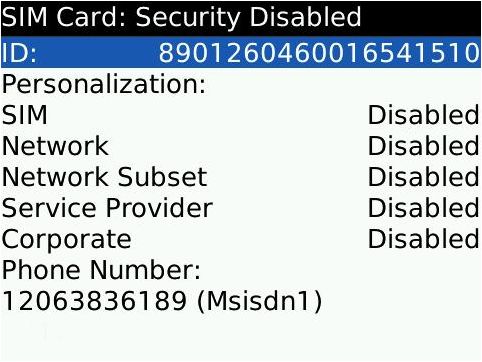
Cellfservices has had some customers purchase an unlock code only to find out that their phone is already unlocked. We would like to clarify that there are 2 methods to see if your phone is unlocked.
The easiest method for Blackberry users is to do the following…
1.) Go to Options
2.) Advanced Options (If you don’t see this entry: Device>Advanced System Settings)
3.) SIM Card
4.) Type MEPD. (You will not see any text appear) — Here you will see a list like the above image.
Normally, all categories are listed as “Disabled” except the Network Category. If your phone is unlocked, it will say Disabled or Inactive beside the Network category. This means your phone is already unlocked :). Before you decide if you want to unlock your BlackBerry, you should also check to see if your BlackBerry is hard locked. With hard locked BlackBerry phones, even with a correct code, you will not be able to enter in the unlock code.
The best and fool proof way for all phones is to put a SIM card into the phone that is not locked to the same carrier. (Ex. Put an AT&T SIM card into your T-mobile phone). I’m sure you have people within your social network that are not on the same carrier.
If you’ve checked everything above and your phone is still locked, you can get your BlackBerry unlock code from our store.
Where do I find my Blackberry PIN? Unlock Instructions for all Motorola Phones
Comments are currently closed.
71 thoughts on “How do I know if my Blackberry is Unlocked?”
« Previous 1 2
9380 curve 359599.04.321402.0 all this are disabled please assist me.
Hi there! If all entries in the MEP menu are disabled, it means your device is already unlocked. If you have any further questions or need assistance, please contact us directly at [email protected]
Blackberry Torch 9800 unlock instructions :
What does it mean if all the five fields read disabled,( phone is locked to Vodafone and I am trying to unlock to use with Rogers Canada ) and after typing MEP2,there is no prompt to enter the unlock code
On top of the screen,it says no valid sim card
If all fields show “Disabled”, this device is already unlocked! :-)
after entering mepd i get “SIM Card :Security Disabled” under it had ID: xxxxxxxxxxxxxxx many numbers
solved by online support….thank you Alex
Everything is disabled…ok bt i cant remove the SOS sign..plz help
@elvin: In this case your device is fully unlocked while the SOS sign could generally have various reasons: Please make sure that the SIM Card is properly inserted and active and that the accurate bands are enabled in case you are switching from CDMA to GSM. If this doesn’t help, feel free to submit a ticket to our Support Desk and we’ll try to troubleshoot this with you.
Hi, I put in a Lyca sim and all features say disabled except for network. top of home screen has invalid sim card written. im in england, the only other sim card i have is italian, called WIND, not yet tried it
@GEORGE: If it says “Active” next to Network, your Blackberry is still locked. If it says “Inactive”, it is fully unlocked.